The problem
It's January. Self-assessment deadline is coming. You open a blank spreadsheet and try to remember every business journey from the past year. You've got some in your calendar, some in your head, some you're just not sure about. You put in what you can, write it off as "close enough", and file.
You're almost certainly leaving money on the table. You just don't know how much.
How it works
TravelSync already creates travel blocks for every physical meeting. As a side effect, it knows exactly where you drove, when, and how far. It records the distance for every journey using Google Maps.
- Automatic distance logging — Every travel block records the driving distance in miles or kilometres. No manual entry, no apps to open in the car, no forgetting.
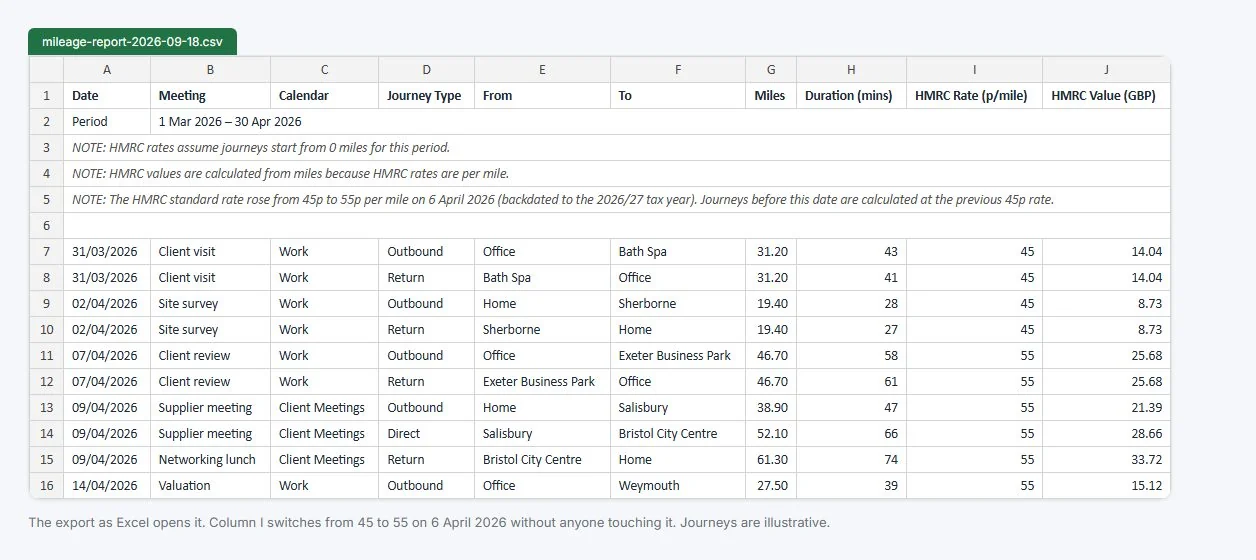
- HMRC approved rates — Mileage exports calculate your claim at HMRC Approved Mileage Allowance Payment (AMAP) rates: 55p/mile for the first 10,000 miles (from 6 April 2026), 25p/mile thereafter.
- EV support — Electric vehicle users get HMRC's Advisory Electric Rate applied instead of the standard tiered rates: 7p/mile for home charging by default, with the 15p public-charging rate a setting away.
- Running totals — The export tracks your cumulative mileage through the year, so you can see exactly when you cross the 10,000-mile threshold and the rate changes.
- Calendar filtering — Choose which calendars to include in the mileage report. If you only want client meetings from one calendar, that's all you get.
- CSV export — Download a clean CSV with date, origin, destination, distance, HMRC rate, and claim value. Ready for your accountant or self-assessment form.
- Configurable tax year — Set your year-end date to match your accounting period. Export for any date range.
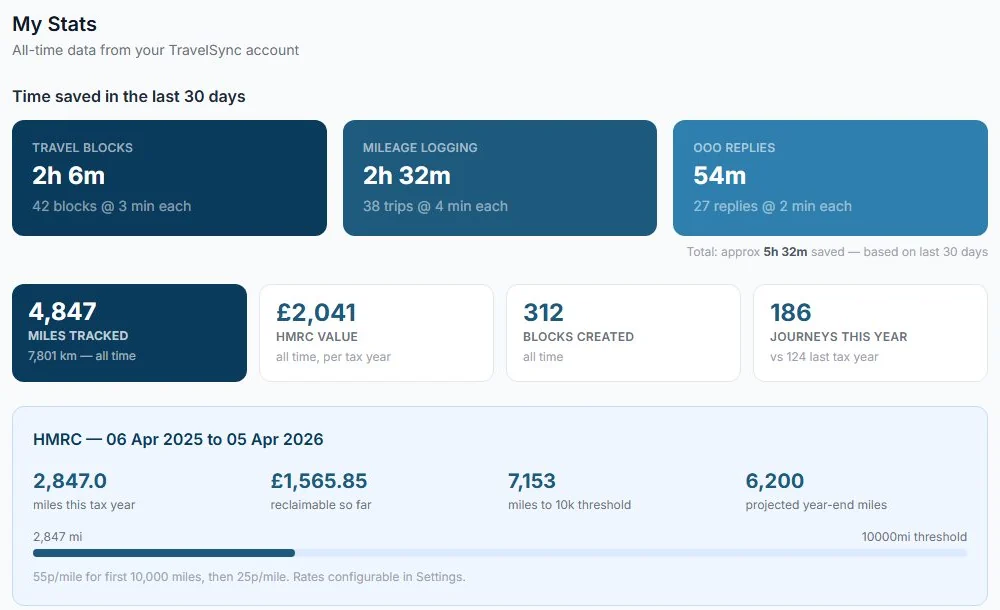
How much are you leaving on the table? A consultant who drives 12,000 business miles a year can claim £6,000 through AMAP rates (at the 55p rate from 6 April 2026). If you're only logging the journeys you remember, you could be missing hundreds of pounds. TravelSync catches them all.
Where TravelSync fits, and where it does not
GPS mileage apps and TravelSync solve overlapping problems from opposite ends. They sense your phone after the fact. We read your calendar in advance. Both produce an HMRC report at the end. Here is what each is actually good at, so you can pick the right one.
| What you need to track | TravelSync | GPS apps (MileIQ etc.) |
|---|---|---|
| Meetings in your calendar with a real address | Yes | Yes, if you drove |
| Walking, train or taxi between meetings | Yes | No |
| EV at the Advisory Electricity Rate | Yes | Manual custom rate |
| Date-aware 45p / 55p (April 2026 rate change) | Yes | Manual |
| Travel time blocked in your calendar so you don't double-book | Yes | No |
| Ad-hoc drives not in your calendar (unplanned site visit, supplier drop-in) | No | Yes |
| Works without an app open or a phone in the car | Yes | No |
If most of your business travel is to meetings that go in your calendar, TravelSync covers it. If a big chunk of your driving is unscheduled, a GPS app is the right tool. Plenty of people use both, and there is nothing wrong with that.
No app, no swiping, no battery drain
TravelSync works entirely from your calendar. If a meeting has a physical address, the mileage is logged. No phone battery to babysit, no Bluetooth dongle, no remembering to start the app before you pull off the drive.
Mileage falls out of the calendar engine for free. The thing you actually use TravelSync for is keeping your day from getting double-booked while you are on the road.
TravelSync's mileage export is a practical tool, not a certified tax document. Review it with your accountant to confirm it meets your specific situation — but it's a significantly better starting point than a spreadsheet you haven't opened since February.