The problem
You're on annual leave. You remembered to clear your diary — but forgot to set your out-of-office reply. Or you set it, but forgot to turn it off when you came back. Or you're on a training day and the native OOO toggle doesn't handle that.
Most people manage their out-of-office manually: toggle it on, toggle it off, hope they remember. Some forget entirely. Some leave it running for three days after they're back at their desk.
How it works
TravelSync already reads every event in your calendar. The OOO auto-responder extends that:
- Add a trigger keyword to any calendar event — put
#holiday,#sick,#training, or any keyword you choose in the event title or the event description. Both are checked. - TravelSync detects the event automatically during its regular calendar scan.
- Incoming emails get an auto-reply using the template you've configured for that keyword — different messages for different situations.
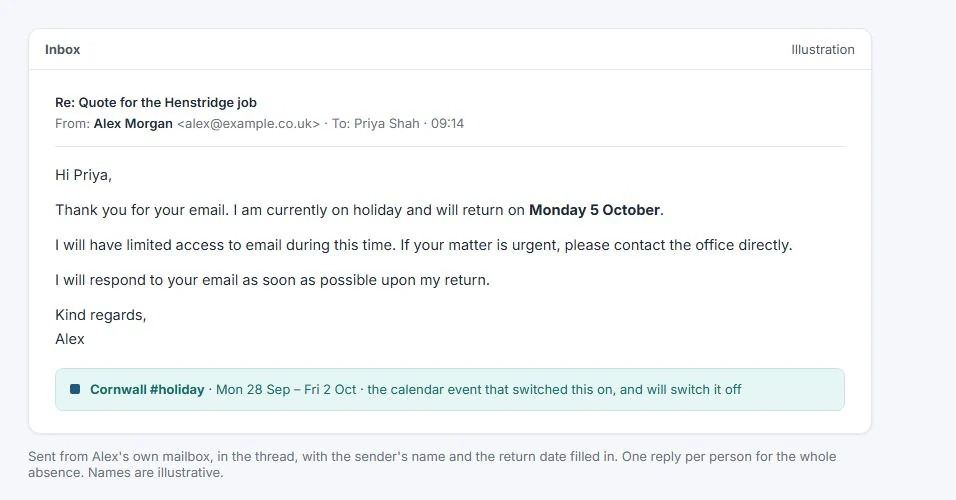
- Replies come from your own mailbox (Gmail or Outlook), not from a third-party address. They appear as normal in-thread replies.
- One reply per sender per absence — if someone emails you three times while you're away, they only get one auto-reply. Even when two OOO periods overlap, senders still hear back just once. No spam.
- You stay in the loop — your dashboard shows a banner while you're away, and TravelSync emails you when auto-replies start and finish (on by default; switch the notices off any time). A Send test reply button emails you a sample before you rely on it.
- When the event ends, it stops — no manual toggle to remember to turn off.
Multiple rules, different messages
Unlike the single-message OOO toggle in Gmail or Outlook, TravelSync lets you set up multiple rules:
#holiday — "Thanks for your email. I'm on holiday until Monday 14th April and will respond when I'm back."
#sick — "I'm currently off sick and expect to return on Wednesday. For urgent matters, please contact the office."
#training — "I'm on a training course today and will have limited access to email. I'll respond tomorrow."
Each rule has its own subject line, HTML-formatted body, and optional calendar selection. You control exactly what gets sent, and when.
Personalised replies
Template variables let you personalise each reply automatically:
{{senderFirstName}}— the first name of the person who emailed you{{returnDate}}— your return date, rolling to the next day after a late finish and skipping weekends{{signature}}— your configured email signature, appended to every reply
So "Hi @{{senderFirstName}}" becomes "Hi Sarah" — and your return date updates itself based on the calendar event.
OOO-aware travel blocking
When TravelSync detects an active OOO event, it can optionally suppress travel block creation for meetings on those days. No orphan travel blocks cluttering your calendar while you're on the beach.
Works with Gmail and Microsoft Outlook
The auto-responder works with both calendar providers. Replies are sent via the Gmail API or Microsoft Graph API — they appear in your Sent folder and thread correctly with the original message.
The first time you use it you'll grant email access: Google users click a Connect email access button on the Out of Office page, and Microsoft users sign out and back in once. It isn't requested when you first sign in, so the core calendar features only ever need calendar access.
Part of TravelSync Pro, £8/month or £80/year, and included in every free trial.
Start Free Trial14 days free. No card required. Cancel any time.
Already have an account? Sign in